Subscribe For Free Updates!

We'll not spam mate! We promise.

Sunday, 24 May 2015

5 Best Must Have Xposed Module for Lollipop

Must Have X-posed Module For LolliPop

What is Xposed Installer
This is the installer for the Xposed framework, which is a requirement for all modules. Xposed is a framework for modules that can change the behavior of the system and apps without touching any APKs. That's great because it means that modules can work for different versions and even ROMs without any changes (as long as the original code was not changed too much). It's also easy to undo. As all changes are done in the memory, you just need to deactivate the module and reboot to get your original system back. There are many other advantages, but here is just one more: Multiple modules can do changes to the same part of the system or app. With modified APKs, you to decide for one. No way to combine them, unless the author builds multiple APKs with different combinations.
LINK  | LINK-HOW-TO-INSTALL-XPOSED-ON-LOLLIPOP |
5 Best Xposed Modules :-
GravityBox 

GravityBox is a module which primary goal is to provide the users of MediaTek platform (which is well known for not being opensource friendly)
with a tweak box to turn their vanilla Android stock ROM into custom ROM packed with additional features and tweaks.
Additionally, it should run on any device having vanilla or close to vanilla Android not diverting too much from AOSP (Android Open Source Project).

LINK FOR JELLYBEAN | LINK FOR KITKAT | LINK FOR LOLLIPOP 
XSTANA

A simple app that allows you to change your NAVIGATION BARS and STATUS BARS icon with help of root access and Xposed module

TINTED STATUS BAR


Tinted Status Bar allows you to change the status bar colour based on the currently running application.
As of BETA 5, this is done automatically for apps that have a standard Action Bar. If an application does not change the status bar colour, configure it to do so manually in the settings app
Unicon
Unicon (formerly Icon Themer) allows you to use Nova/Apex/ADW etc. icon packs on your device.You can now use any launcher you prefer (especially Stock launchers!) and still have the power to customize how your application icons look like.(Note: If your launcher is replacing the icons with their own theme, Unicon would appear to be not working). Unicon is also more consistent because the icon theme is applied throughout your device and not just confined your launcher!

| LINK |

Serajr Blurred System UI


 New preference to give drag handle bar a translucent value (status bar expanded) Fixed App Action Bar FC on some firmwares Xperia Look and Feel (Xperia devices only) Russian translations Updated French translations - thanks xda Updated Spanish translations - thanks xda 
 LINK

CREDITS
XDA DEVELOPERS
XPOSED DEVELOPERS
ME - ONLY FOR SHARING

| TIP-PLEASE MAKE A NANDROID BACKUP DONT DAMAGE YOUR PHONE I.E YOUR DEVICE |

How to Extract source code from APK

How to Extract source code from APK

Are you an Android enthusiast? Did you ever wish to customize an app to your needs? Wondered how you can get source code of an android app In this post, I will teach you how to get source code of an android apk file along with resource files like XML files, images,icons everything that is part of an apk.

Here is the method or guide showing how to do it.

What You Need 
1.Download the apk file for which you want the source code.
2.
Download Dex2jar from here
3.
Download jdgui, a java de-compiler to get .java files from .class files here
4.
Download apktool-install-windows-r05-ibot.tar.bz2 ( for windows ) and apktool1.5.2.tar.bz2 from here

Procedure
1.extract these two folders and you get 3 files. 
(Put all these files in one folder -  aapt.exe, apktool.bat and apktool.jar)
2.Copy the apk file into this folder.
3.Open CMD and change directory to the folder where you have aapt.exe and other files. 
( Press shift and right click in dex2jar folder to open command prompt there - a shortcut)
4.run this command  [apktool decode apk-file-name.apk]
5.You get All Resource files ( media files, XML files )and AndroidManifest.xml inside the folder com.test.app folder.6.Keep a copy of apk file and rename the .apk file to test.zip and extract using any unzipping soft wares.
 ( rename test.apk to test.zip and extract.).
7. You will have a folder with the zip-file name ( for example here "test").
8.Now extract dex2jar file you downloaded move the classes.dex file in test folder (from the apk you just extracted into dex2jar folder.
9.Open CMD and change directory to dex2jar folder. 
 10.Press shift and right click in dex2jar folder to open command prompt there - a shortcut)type  [d2j-dex2jar classes.dex]
11. you will get a file classes-dex2jar.jar file in dex2jar folder.12.Open jd-gui, click on File, Open and select the classes-dex2jar.jar file you got in the previous step and click on File, Save all resources and save it to file. 
Now extract that file you will get all the .java files for that apk.
Create a new folder src in  com.test.app folder you got and move the contents of folder created by jd-gui intosrc folder.
Now you have got all the resources and java files for the apk file.

Credits
X.D.A Developers

Recent apps like lollipop for JellyBean [Theme With Me]


Recent Apps Mod 
Items Required :- 
1) SystemUI.apk
2) Apktool
3) Text Editor (Notepad ++) from here

Procedure:- 

1) First of All decompile SystemUI.apk using apktool.
2) Now Goto res/layout folder.
3) Open status_bar_recent_panel_item.xml
4) Now in its line no. 2 add this code android:rotationX="-10.0"
5) Save it.
6) Also Open Status_bar_recent_panel.xml
7) In line no. 2 add android:rotationX="10.0"
8) Save it.
9) Recompile and push meta inf and androidmanifest.xml of your original apk to the modded one. 
10) Push it and set permissions to rw--r-r.
Tip:-Please sign the modded apk and make a nandroid backup before doing anything
How To Decompile APK

CREDITS
X.D.A Developers


Saturday, 23 May 2015

APkTOOL FOR ANDROID

APKTOOL

A tool for reverse engineering 3rd party, closed, binary Android apps. It can decode resources to nearly original form and rebuild them after making some modifications; it makes possible to debug smali code step by step. Also it makes working with an app easier because of project-like file structure and automation of some repetitive tasks like building apk, etc.
It is NOT intended for piracy and other non-legal uses. It could be used for localising, adding some features or support for custom platforms, analysing applications and much more.

WHAT YOU NEED
1)Root access
2) files download them from here
3)Respect                    
4)Patience

How To Setup APK TOOL
1)Grab the latest version of apktool zip file from above link.
2)extract it to your internalsd/apktool/here.
3)done now use it for decompiling,recompiling modifying apk.

Some Commands of apktool and their Usage :- 
1.You need to install the file using the " IF " command.
for example-
  
                           "apktool if systemui.apk"
2.You need to  decompile or unpack the file by "d" command.
for example-
  
                            "apktool d systemui.apk"

3.You need to  Recompile or repack the file by "b" command.

                            "apktool b systemui.apk"
                 Tip - Don't Forget  To Sign The modified apk file
Credits
I am only Providing this information  to you.
Me [ https://www.facebook.com/developerace]
XDA-Developers
APK-TOOL Developers


Sunday, 29 March 2015

How to Dual Boot

How To Dual Boot

WHAT YOU NEED:-

  • ISO images of both operating system [search on www.google.co.in/] 
  • Backup of your  Hard Disk Drive
  • Little Respect 
  • Brain
  • Download the ISO according to your architecture for ex- if u 32bit  windows 7 then downloads 32 bit ubuntu or another os which u want to install..
Lets Start :- 
There are two Methods For Installing Ubuntu :-
1. Inside Windows Safe Method No Data loss.
2.On Another Partition So That Each Time You Start You Have to Choose.

Method No :- 1


  1. Download Virtual Box From here
  2. Install it as Normal Software 
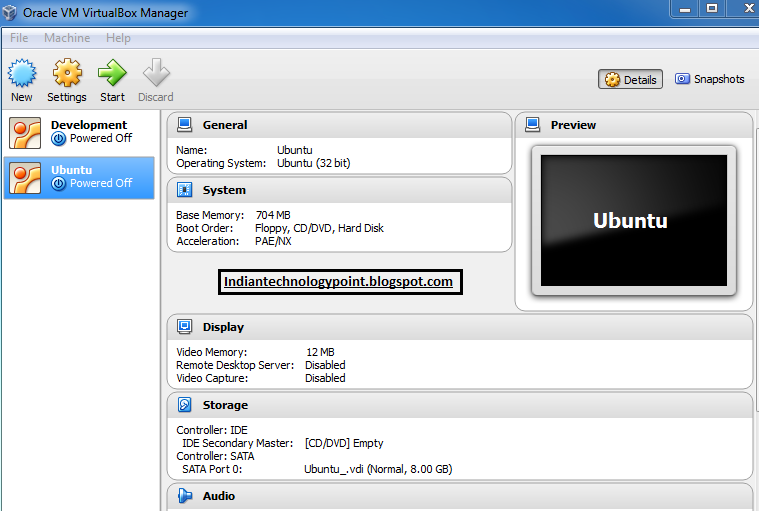
  3. Now Click on New Button 
     
  4. Now Write the name of the O.S you Want to Install.

                                     
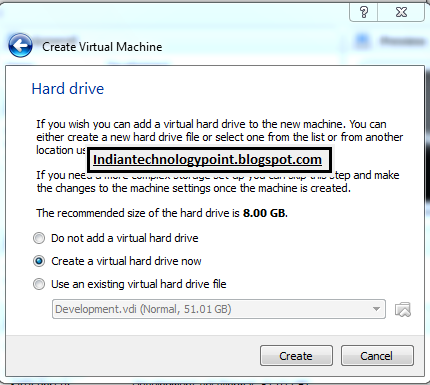
5.Allocate the Ram Size you want to allot to the guest O.S (Advice 768 mb is enough)


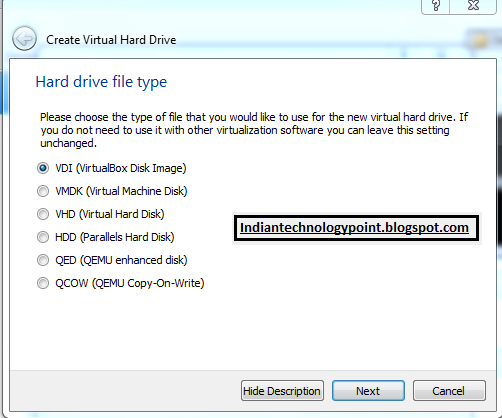
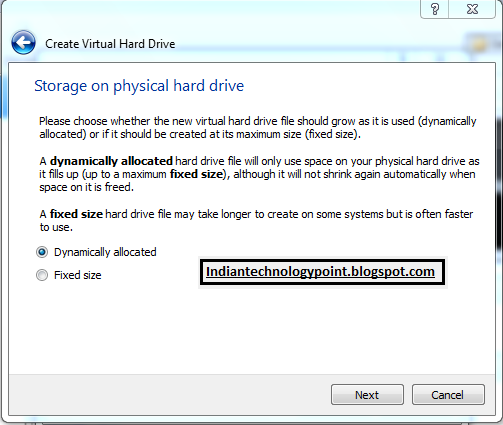
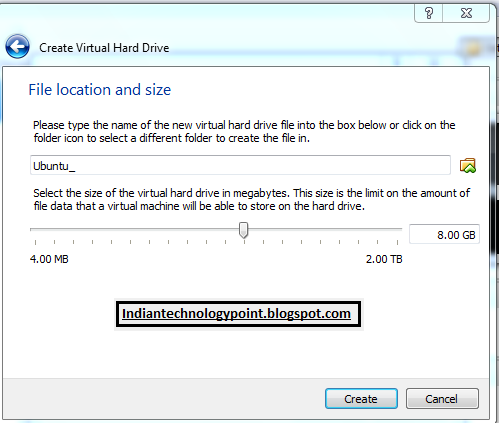
6. Now You Need to allocate the Size of Hard disk.(Advice-50 gb is enough)


7.Now You Will See A New Tab in the Left Panel.


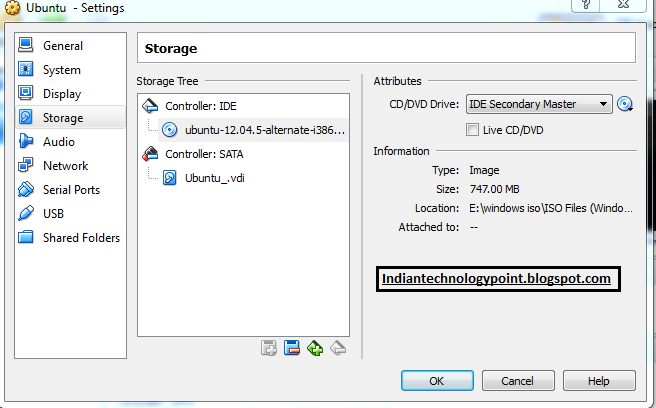
8.Now Click On Settings icon and navigate to Storage and click on the disk item in the right side and choose the downloaded ISO image to want to install (note only install the OS which u want to dual boot.


9.Now Click on start and install the OS dont worry your data is safe.


Method:-2  I will post it Soon... :)


Catch me on facebook.com- www.facebook.com/developerace

Saturday, 21 March 2015

LATEST IDM CRACKED FREE DOWNLOAD

LATEST IDM CRACKED FREE DOWNLOAD {WORKING TRICK}

1)After extracting downloaded file you will get the following:-


2)Install the program by double clicking idman623build7.exe. 
3)After installation please exit idm from  icon tray.

4)Open downloaded file Once again now open crack folder now copy "IDMan.exe" & "IDMGrHlp.exe".
5)Paste it to default install location normally C:\Program Files\Internet Download Manager.
6)Open downloaded file folder Once again now open RegKey folder now run Regkey.Reg.
7)enjoy!


Saturday, 6 December 2014

How to Deodex Kitkat Rom and lollipop also

KitKat deodexer 
Intro:-  Hi folks i am Ace Aggarwal i present to you my first software or project which is deodexer for all roms Its based on kamome tool  
Please feel free to message me i love to help all
Requirements
  • Java
  • Rooted phone
  • Odexed rom
  • USB Debugging enabled (If you want to pull files from your device)
  • Custom Recovery (Tested on CWM)

Procedure

  1. Extract downloaded tool
  2. Run main.bat
  3. Type 1 to create working folder
  4. Plug in your phone, then type 2 to pull files from your device
    This step can be skipped if you manually copy /system/app, /system/framework, /system/priv-app to /Kitkat_Deodexer/system
  5. Type 3 to start deodexing operation
  6. Type 4 to create flashable zip
    This step also can be skipped if you want to build your own flashable zip by editing updater-script
  7. Done

How to install it

  1. Copy deodex_install.zip to your sdcard
  2. Go to CWM recovery
  3. Flash the zip
  4. Done

WARNING:-ALWAYS DO A NANDROID BACKUP

                         Download link for my deodexer:-Click to Download

Dont steal my work make your own i will help you 

My Facebook Profile : https://www.facebook.com/developerace 
My goggle email address: aggarwalace@gmail.com                                                                                     
Tested Roms
Micromax Unite 2 all kitkat roms
CM 5.0 Roms


THIS TOOL BASED ON KAMOME TOOL CREDITS TO REAL DEV AND TO ME FOR JUST MODIFYING
HIS THREAD LINK-->http://forum.xda-developers.com/showthread.php?t=2713329